
Native Instruments Massive XL review: flagship wavetable synth celebrates 20 years with a major upgrade

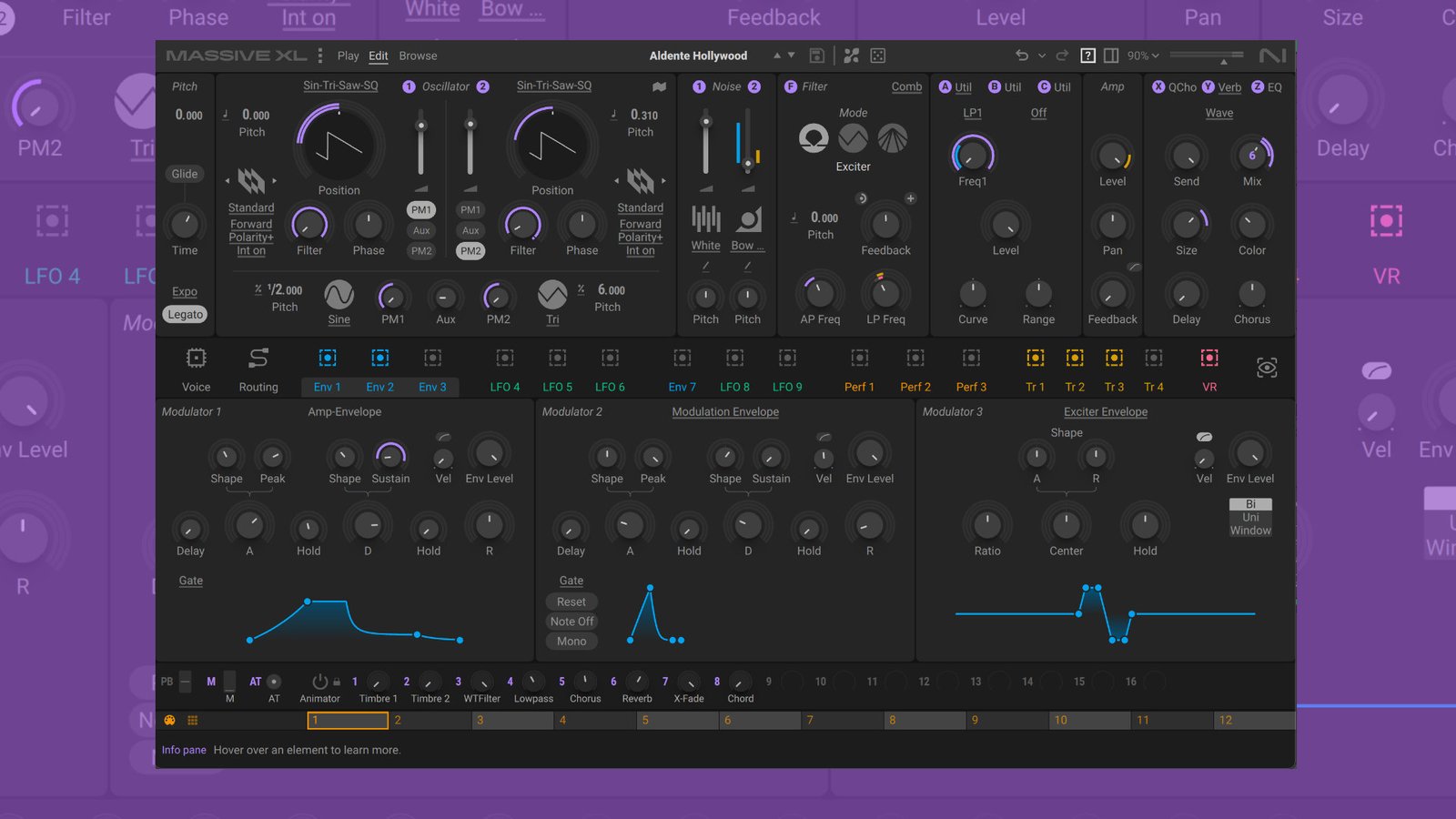
Native Instruments Massive XL upgrades its flagship synth with a redesigned interface, wavetable import, new effects, and AI-powered extras.
Native Instruments released Massive in 2006, and it became the go-to wavetable Synthesizer for many electronic music producers. The tide turned in 2014 when Steve Duda of Xfer Records launched Serum. A new industry standard was born.
NI took a long time to respond to Serum, but in 2019 they launched Massive X. Expectations were high, but over the past seven years, they haven’t been entirely met (plain user interface, missing features…). Native Instruments is making a new attempt with Massive XL—a major upgrade that dropped today.

Native Instruments Massive XL Summary
Pro
- redesigned UI
- improved modulation visualizations
- wavetable import
- Creative effects
- Fun and useful AI-powered preset mutation and generator
- polyphonic aftertouch support
Neutral
- An upgrade for $49 (intro) is okay, but others have been offering the same content as free updates for years.
- Still more CPU intensive (between 17% – 40% with an M4 (standard) and 32GB depending on the patch)
Contra
- Better UI but far from being great
- Just a wavetable synth vs. Pigments, Serum… are multi-engine synths
- No wavetable editor
Index
Native Instruments Massive XL
Massive XL is the official successor to Massive X, released in 2019. It’s crazy how quickly seven years have gone by. With Massive XL’s release, Native Instruments also discontinued Massive X and removed it from the market.
It’s still unclear whether there will be any further maintenance updates. However, I’m certain that a new version of Massive XL Player is available: a free edition that lets users play sounds and experiment with macros and the Animator feature.
Massive XL remains a wavetable Synthesizer plugin, featuring two oscillators, various filters, deep modulation capabilities, semi-modular signal flow, and more.
The new version includes a few major engine changes, but much stays the same. According to Native Instruments, they focused heavily on the interface and workflow.

Main user interface refinements
The first major change is immediately apparent when you open the plugin: NI redesigned the user interface. This was to be expected after Massive X’s pretty lifeless, pale, and far-from-enjoyable interface.
However, they didn’t quite manage a complete overhaul. The new interface still looks a lot like the “X” version, though it has some major welcome improvements. The options are white or black. I’m sticking with the black UI, as the white one doesn’t offer enough contrast.
Let’s start with the changes at the very top—the header—which has been completely reorganized and expanded. The new undo/redo functionality and the option to easily resize the plugin are welcome additions.

The settings menu on the left has also been overhauled and now offers more options for managing user content, adjusting the interface’s visual appearance, and more. You can also switch between the black and white interfaces, plus a new flat mode that removes shading.
Massive XL now introduces sub-presets for its core components—oscillators, filters, inserts, effects, and more. This allows users to conveniently save specific settings and apply them to other patches. This accelerates the workflow.

Oscillator & modulation UI refinements
Massive XL still features two wavetable oscillators. The XL version’s visualization remains very cluttered, but there is an alternative. A new focus mode lets you edit each oscillator independently in a larger space.
Click the small flag icon to access this mode. It gives you a full visualization of the wavetable and a clearer list of available parameters. This new focus mode helps a lot and makes it more fun to use.

Massive X’s modulation engine was a strength, and it remains a strength in Massive XL, benefiting most from the redesign. The visualization has been completely overhauled.
This starts with animated modulators. You can now see modulation in real time, with visual feedback showing exactly how parameters are influenced. This brings a sense of life to the UI that was previously missing. A good decision!
Modulation assignments are now easier to identify, too. In Massive X, mapped modulators were always visible directly on the knob, and when many were active, it quickly became very cluttered. This is different in Native Instruments Massive XL.
Simply hover your mouse over a knob to see which modulators are assigned to it. Normally, they are hidden and only become visible when you hover over them. Thanks to color-coding, this is very clearly laid out. It’s a better implementation than in X.

Also practical is a new button on the right-hand side that reveals all active modulation sources in a patch simultaneously. The envelope handles are also now draggable, making them more hands-on.
Alongside these improvements, Massive XL also adds new context help with feature explanations directly inside the instrument, customizable user banks, and other smaller refinements.
Overall, these improvements significantly enhance the user interface and bring it more life. While the new “XL” interface is still not exactly a highlight—feeling somewhat sterile compared to competitors like Serum 2, Pigments, etc.—progress has definitely been made.
Wavetable Import
Native Instruments has not only given Massive XL a new user experience but also upgraded the sound architecture. Let’s start with the motor—the wavetable oscillators.
There are still two, and they retain the same features as Massive X. The new version, however, adds 100+ new wavetables, including material from the original Massive and classic PPG wavetable content.
It seems the new team at Native Instruments (NI) discovered the folder from “PPG Apps”—an asset they inherited when inMusic acquired the company. (PPG Apps had previously been purchased by Brainworx.) It also includes 100 new noise tables.

It took 20 years, but now something almost unimaginable is possible: users can import their own wavetables or drag samples into the oscillator to generate their own custom wavetables.
It’s a sample-to-wavetable converter that works seamlessly with any material you use. There is still no wavetable editor, but at least you can now import wavetables—a turning point for Massive.
New Effects
No new filters have been added, but you can now work with three new effects: Raum, Replika Shimmer, and Tape Wobble.
Raum is a port of the great-sounding reverb plugin of the same name. It offers three distinct reverb algorithms, from tight ambiances to otherworldly soundscapes. It adds predelay feedback and unusual modulation capabilities to Massive XL’s reverb menu.

Then, Replika Shimmer combines delay, pitch shifting, and reverb in a multi-FX effect that creates classic shimmering sounds and more. The pitch shifter is especially powerful: you can apply it either to the delay output or within the delay’s feedback loop.
A great-sounding effect that lets you quickly create ambient soundscapes. For those who prefer something grittier and dirtier, Massive XL also introduces new Tape Wobble FX that emulates the sound of analog tape machines.
It houses the classic controls, including wow and flutter, saturation, age, and more. A fairly simple effect, but one that can envelope your sounds in vintage fashion. Like the other effects, the new trio is also fully modulatable, using the built-in modulation.
Polyphonic aftertouch support has finally arrived—albeit very late. This should have been included right from the release of their own poly aftertouch Komplete keyboards in Massive X.
Absynth-style Mutations
AI is the hottest topic in the music tech world right now. Whether you’re developing plugins or creating smart tools, you can’t avoid artificial intelligence—and now it’s in Massive XL.
Native Instruments has added a set of new, creative, AI-powered tools to Massive XL to speed up sound discovery without sacrificing control. The first new tool is an advanced algorithmic sound mutator that allows you to transform existing patches into new ones.

For this, they added a new side view to the existing interface, which you can open from the header. NI says that the mutate view is a homage to the preset mutation feature in Absynth 6.
The “Mutate All” function is the fastest way to mutate an entire patch. More interesting, however, is the granular level of control, which allows you to mutate individual elements of a patch—such as the oscillator and its wavetables, noise, filter, and more.
Divergence lets you control how far mutation strays from your starting point, so you can choose between subtle changes and a radical transformation. As with Absynth 6, there is a “mutation history” that allows you to jump back to previous mutations at any time.
You can also randomize individual modules while keeping your favorite elements intact. The more randomness you use, the more drastically the sound changes, and the results tend to lean further toward noise. In this regard, *Mutations* is somewhat more restrained and pleasant.
AI Preset Generator
“Generate” is the second new creative tool, introduced with Massive XL. It’s an intriguing AI-powered preset generator. It lets you create new presets not with a text prompt, but with any audio files.
First step: load an audio file (30 sec max) by dragging and dropping it or selecting it from your hard drive. It supports WAV, AIFF, MP3, OGG, or FLAC files. This could be an individual sound or an excerpt from a song. A machine-learning-powered stem separation algorithm creates the stems you need.

Once loaded, adjust your sample, press generate, and the AI model from Native Instruments analyzes the audio file—processed locally on your computer—and transforms it into a patch. The whole process takes only a few seconds.
Each generation offers four preset variations to explore. More than 30 character parameters (grit, complexity, punch, crush…) are tightly integrated into the process, letting you tweak the generated sounds. Which parameters are available depends on the specific sound.
If you aren’t satisfied with the generated result, you can trigger the “regeneration.” At this stage, you can also set how closely the preset generation mimics the sound of the loaded audio. To the left, a match; to the right, an imaginative sound.
In practice, it’s a lot of fun. At first, I wondered who would actually need it, but the more I’ve worked with it, the more enjoyable it’s become.
The quality of the results depends heavily on the complexity of the original sounds; for simpler sounds, the results are impressively good. If you’re working with heavy modulation or a mix of many different sounds, the AI model struggles a bit, and the results aren’t that great.

Expanded Morpher
Last summer, NI released the Massive X 1.5 update, featuring the new Play section and its animator. It’s a creative tool that lets you morph into new ones using four presets and macro controls. The free Player version also includes this playful feature.
You can morph either manually with the mouse or automatically, synced along predefined paths. The range of sound alteration is remarkable; the free Player version, in particular, offers a vast array of sounds to explore.
In Massive XL and Massive XL Player, Native Instruments added the new morpher freeze mode. This new playback mode locks the Morpher position for each new note you play, giving you instant, note-triggered variations of your sound.
A fun new mode that reminds me of the “Aphex Twin mode” on the Novation Bass Station, where each note gives you a new sound. This follows a similar vein.
Neither Massive X nor Massive XL includes a mode that lets you draw or record your own path—a feature I would have liked to see, similar to what Rob Papen plugins offer.
Finally, it ships with over 200 new presets, plus minor improvements here and there. CPU performance remains high, but it hasn’t improved over the X version—a pity.
Native Instruments Massive XL Review Conclusion
Seven years after Massive X’s shaky release, Massive XL is here. It’s also Massive’s 20th birthday. Happy Birthday!
In 2014, many people switched to Serum, and interest in Massive waned. Massive X never really made up for it. While Massive X still has a good user base, many have moved over to the Serum or Pigments communities.
In my view, Massive XL won’t recover that lost ground either. It continues where MX left off. The new features are great additions—though they are also the kind of features you’d expect in Massive X from the start.
It’s a bit strange that it took 7 years to come up with the brilliant idea of installing wavetable import and others. The new AI features are fun and creative additions. Sonic Charge already implemented this three years ago in Synplant with the genetic engine.
I welcome the UI redesign. They’ve listened to the criticism and made improvements. That said, I wouldn’t go so far as to say I love it; it still feels a bit pale and rather monotonous compared to the competition. But they took steps, and hopefully these aren’t the last.
Massive is continuing, which I welcome. Whether they should charge for this is debatable—especially given the features that really should have been in Massive X from the start.
The biggest problem with Massive XL is that it’s just a wavetable synth. The competition has long since moved ahead, now offering multi-engine synths. Some might appreciate the one-engine simplicity, but one has to consider what MXL is up against—and the competition is strong, very strong.
Availability
Native Instruments Massive XL is available now at an introductory price of $ 149/£129/€149 instead of $ 199/£179/€199. Massive X owners can upgrade to Massive XL for €49 / $49 / £44 instead of €69 / $69 / £59.
Owners of the original Massive can crossgrade for €99 / $99 / £89 during the introductory period. These intro prices are valid from October 27, 2026 through December 31, 2026. It runs as a VST, VST3, AU, and AAX plugin on macOS (native Apple Silicon + Intel) and Windows.
More information here: Native Instruments
Plugin Review
Plugin News